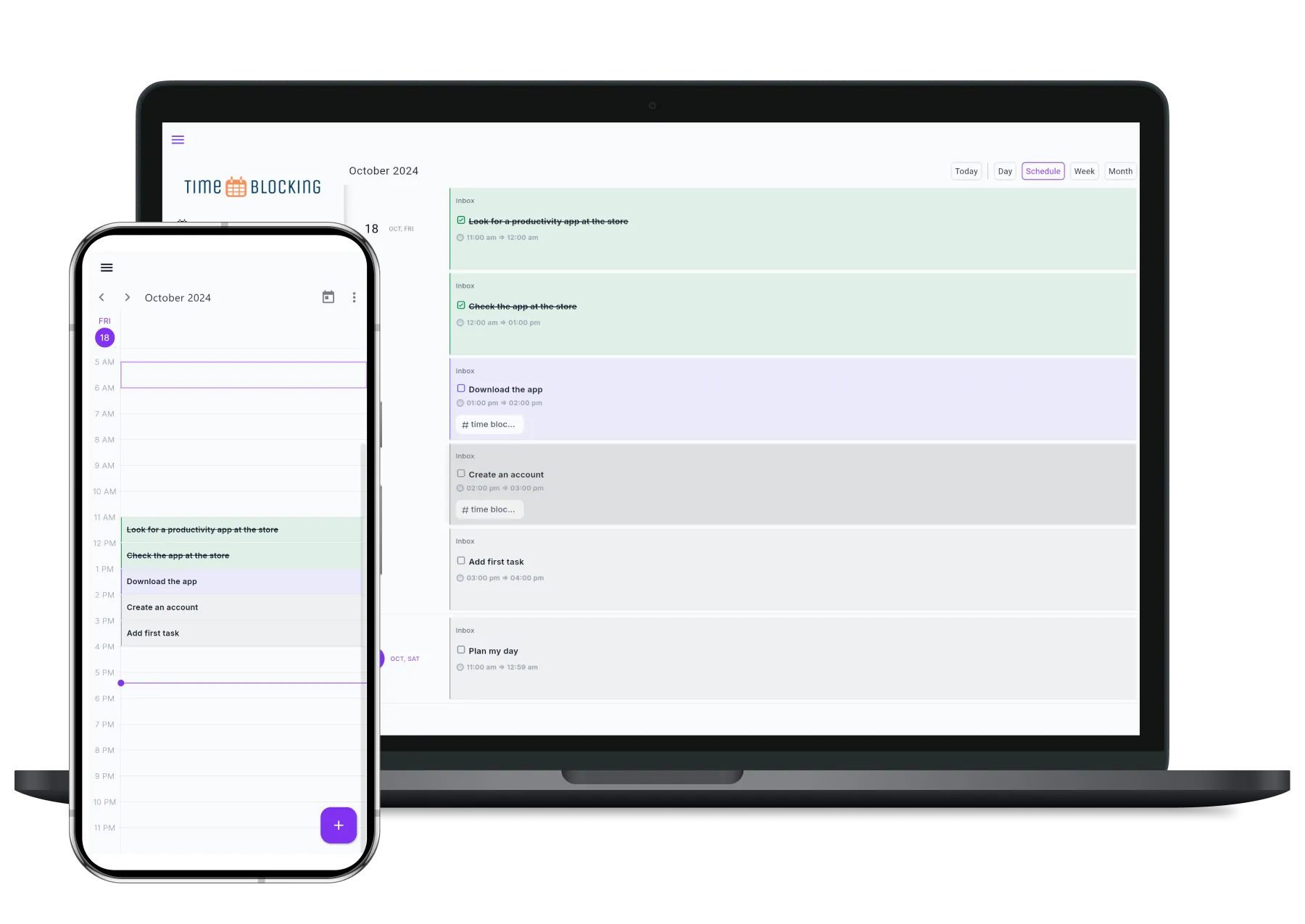

The Time Blocking App is a task management app built with Flutter available for Android and Web, designed to help users stay organized and productive through time blocking methodology, Free Forever
Table of Contents
🧑💼 My Role & Contributions
For an open-source application, I was responsible for the entire development lifecycle, from initial concept to deployment and ongoing maintenance.
Key contributions:
-
Managed the project lifecycle, including feature planning, implementation, testing, and releases.
-
Designed and implemented the initial UI/UX architecture, translating ideas into a scalable and user-friendly interface.
-
Developed the complete Flutter application, handling all front-end logic and state management for Android and Web.
-
Built and maintained the backend using Supabase, including:
-
Database design
-
Authentication and authorization
-
API integration
-
-
Ensured code quality through consistent refactoring, documentation, and adherence to best practices.
-
Maintained and evolved the project post-release by fixing bugs, reviewing users feedback, and adding new features.
🌟 Features
- Smart Task Management:
- Create, organize, and prioritize tasks with ease
- Flexible task views (List view, Calendar view, grouped by Tag)
- Custom tags and lists
- Priority levels and due dates
- Intelligent Calendar Integration:
- Seamless calendar view of all your tasks and events
- Time blocking capabilities
- Schedule visualization
- Event drag-and-drop
- Multiple calendar views (Day, 2 days, Week, 2 weeks, Month)
- Accessability:
- Supports English and Arabic languages
- Access the application from any device via web browser
🚀 Try the app
-
Download Android app 📱: Link to Google Play
-
Use web app 🌐: Web app link
Competitors analysis
| Time blocking app | Sorted | Apple Reminder | Fantastical | Ticktick | Clickup | |
|---|---|---|---|---|---|---|
| For personal use | Yes | Yes | Yes | Yes | Yes | too Complicated for personal use and the app is to cluttered |
| Task and events are handled differently | No | Yes | only tasks are available | Yes | Yes | No |
| Available for Web | Web only | iPhone and Mac only | iPhone and Mac and web only (with iCloud account) | No | Yes | Desktop, iPhone and Android |
| Pricing | Free | Free and Paid | Free | Paid | Calendar is Paid | Free and Paid |
Time blocking app
- Personal use friendly ✅
- Unified task and event handling
- Available on Web
- Free forever
Sorted
- Personal use friendly ✅
- Separate task and event handling
- iPhone and Mac only
- Free and Paid plans
Apple Reminder
- Personal use friendly ✅
- Tasks only
- iPhone, Mac and Web (iCloud account)
- Free
Fantastical
- Personal use friendly ✅
- Separate task and event handling
- No Web version
- Paid only
Ticktick
- Personal use friendly ✅
- Separate task and event handling
- Available on Web
- Calendar feature requires paid plan
Clickup
- Complex for personal use
- Unified task and event handling
- Desktop and Mobile apps
- Free and Paid plans
🛠️ Under the hood
UI design
Project Structure
The project is organized into the following main directories:
| Directory | Purpose |
|---|---|
lib/core/ | Contains application-wide functionality like dependency injection, networking, routing, and analytics |
lib/features/ | Contains feature-specific modules (tasks, auth, schedule, etc.) |
lib/common/ | Contains shared entities, models, and enums used across features |
🏗️ Architecture Overview
Since this is a project that I intent to support for a long term, so the architecture implemented is Clean Architecture , to maintain separation of concerns, testability, and scalability. The architecture is divided into three primary layers:
| Layer | Responsibility | Key Components |
|---|---|---|
| Presentation | Handles UI rendering and user interactions | UI widgets, BLoC components |
| Domain | Contains business logic and use cases | Use Cases, Repository interfaces, Entities |
| Data | Manages data retrieval and persistence | Repository implementations, Data sources, Models |
💻 Tech Stack
Frontend (Mobile and Web)
- Framework/Library: Flutter
- State Management: Bloc
- Testing: Flutter Test
- Navigation : go router
- Log : logger
- Local storage : shared preferences
- Localization : easy localization
- Calendar : kalendar
Backend and Database
- Backend as a service: Supabase
Tools
- Error Monitoring: Sentry
- Analytics: Posthog
🛣️ Roadmap
- Google calendar sync
- Recurring task
- Add attachments to tasks
- Subtasks
- Markdown description
- Add location to task
- Map view of tasks
- Voice input of tasks
- Create tasks with email
- Auto scheduler
- Trash page
- Export list of tasks as text
- Improve UI and UX
🐞 Reporting Issues
If you find any bugs or have suggestions, please open an issue on GitHub Issues page.
When reporting an issue, please include:
- A clear and concise description of the bug.
- Steps to reproduce the behavior.
- Expected behavior.
- Screenshots or videos (if applicable).
- Your environment (OS, browser, app version, etc.).